
What's inside
- Why the Best 120mm Case Fan for Cooler Master Elite 130 Needs Good Airflow
- Best 120mm Case Fan for Cooler Master Elite 130: Airflow, Noise and Bearing
- Best 120mm Case Fan for Cooler Master Elite 130 Comparison Table
- Top 120mm Case Fans for Cooler Master Elite 130 Reviewed
- Where to Mount a 120mm Fan in the Cooler Master Elite 130
- Buying Guide: How to Choose the Best 120mm Case Fan for Cooler Master Elite 130
- How to Keep a Cooler Master Elite 130 Cool and Quiet
- Frequently Asked Questions
As an Amazon Associate I earn from qualifying purchases. This post may contain affiliate links at no extra cost to you.
Finding the best 120mm case fan for Cooler Master Elite 130 is about choosing a fan that fits the small Elite 130 case, moves enough air to keep a compact build cool, and stays quiet enough to use every day, with a fan that works well for a mini-ITX system, and with a price that fits a builder who wants a reliable fan without a large, expensive premium model that is too loud for a small case. A good 120mm case fan for Cooler Master Elite 130 should have good airflow, low noise, and a price that gives you value. It should also be simple to install, with a design that is suitable for a beginner. Always check the fan size, airflow, noise level, and connector before buying, and follow the manufacturer guidance for use.
This guide explains what to look for in the best 120mm case fan for Cooler Master Elite 130, how to compare airflow, static pressure, noise, bearing type, and price, and which 120mm case fans work well in 2026 for the Cooler Master Elite 130. We focus on practical use for builders who install a fan for the first time, with a fan that is used for front intake, side intake, or exhaust in a compact Elite 130 build, and with a design that is suitable for a beginner. Whether you build a gaming PC, a home office PC, or a compact media PC in the Elite 130, the same principles apply: choose a fan that fits 120mm mounts, moves air well, and stays quiet, with a price that fits your needs. Always check your fan specifications before buying, and check your case manual for the correct fan positions.
Our Top Picks
Why the Best 120mm Case Fan for Cooler Master Elite 130 Needs Good Airflow
The best 120mm case fan for Cooler Master Elite 130 needs good airflow because a fan such as the Noctua NF-A12x25 is designed with high airflow that moves cool air into a small case, while a fan with low airflow may let temperatures rise in a compact build. Good airflow is better than low airflow for the Elite 130, because the case is small and heat builds up quickly. A fan with an airflow of 50 CFM or more is a good choice, because it moves enough air. A fan with good static pressure is better if you mount it behind a filter or a drive cage, because it pushes air through resistance.
A 120mm case fan for Cooler Master Elite 130 also needs low noise. A fan with a noise level under 25 dBA is a good choice, because it is quiet. A fan with a fluid dynamic bearing is better if you want a long life, because it is durable and quiet. A fan with a good price is a good choice, because it gives you value. Look for a fan with PWM control, so it speeds up only when your system gets hot.
Best 120mm Case Fan for Cooler Master Elite 130: Airflow, Noise and Bearing
Airflow matters most for the best 120mm case fan for Cooler Master Elite 130, because it determines how much cool air reaches your CPU, graphics card, and power supply. Fans with an airflow of 50 to 60 CFM are a good choice for most Elite 130 builds, while fans with an airflow above 60 CFM are better if you have a hot graphics card or a powerful CPU. Fans with high airflow are better than fans without, because they cool a small case. Fans with good static pressure are a good choice, because they work well behind filters.
Noise also matters for a small case that may sit on a desk. Fans with a noise level of 22 dBA or less are better than fans with a higher noise level, because they are quiet. Fans with PWM control are a good choice, because they run slow at idle and fast under load. Fans with a fluid dynamic bearing are better than fans without, because they last longer and run smoother. Fans with a good price are a good choice, because they give you value.
Best 120mm Case Fan for Cooler Master Elite 130 Comparison Table
| Model | Airflow | Noise Level | Bearing | Connector | Typical Price Range | Rating |
|---|---|---|---|---|---|---|
| Noctua NF-A12x25 PWM Fan | 60 CFM | 22.6 dBA | SSO2 | 4-pin PWM | $25-$35 | 4.9/5 |
| Arctic P12 PWM PST Fan | 56 CFM | 22.5 dBA | Fluid Dynamic | 4-pin PWM | $10-$15 | 4.8/5 |
| Corsair ML120 Pro Fan | 75 CFM | 25 dBA | Magnetic Levitation | 4-pin PWM | $20-$30 | 4.7/5 |
| be quiet! Silent Wings 4 120mm Fan | 48 CFM | 18.9 dBA | Fluid Dynamic | 4-pin PWM | $20-$30 | 4.8/5 |
| Cooler Master SickleFlow 120 Fan | 62 CFM | 27 dBA | Rifle Bearing | 4-pin PWM | $10-$15 | 4.7/5 |
| Thermalright TL-C12C Fan | 66 CFM | 25.6 dBA | Fluid Dynamic | 4-pin PWM | $10-$15 | 4.7/5 |
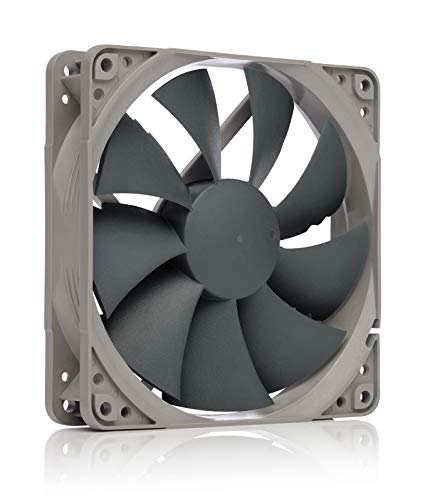
Noctua NF-P12 redux-1700 PWM, Quiet Fan 120mm | High Airflow, Low Noise, 25mm Thick Fan for PC and Electronics Cooling Streamlined Package 1700rpm 4-Pin PWM


As an Amazon Associate we earn from qualifying purchases. Product prices and availability are accurate as of the date/time indicated.

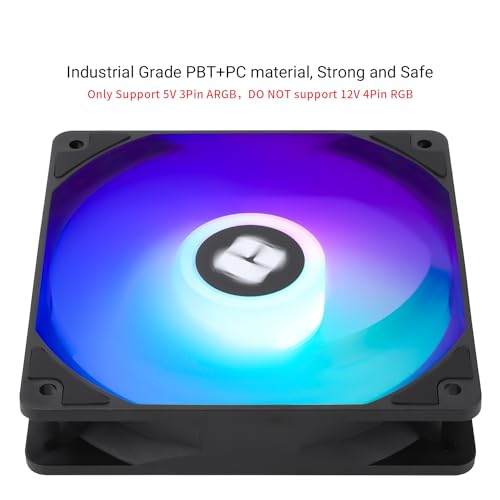
Thermalright 5 Pack TL-C12C-S CPU Fan 120mm ARGB Case Cooler Fan, 4pin PWM Silent Computer Fan with S-FDB Bearing Included, up to 1550RPM Cooling Fan(5 Quantities)



As an Amazon Associate we earn from qualifying purchases. Product prices and availability are accurate as of the date/time indicated.

be quiet! Pure Wings 3 120mm Black PWM Triple Pack, 3 Included Case Fans | High Top-End Speed Gaming PC Computer Air Fans, 4-Pin, Low Minimum RPM, Optimized Fan Frame, Newly Designed Fan Blades
As an Amazon Associate we earn from qualifying purchases. Product prices and availability are accurate as of the date/time indicated.
Prices shown are approximate and for reference only. Prices change often, so please check the current price on Amazon before you buy.
Top 120mm Case Fans for Cooler Master Elite 130 Reviewed
Noctua NF-A12x25 PWM Fan
The Noctua NF-A12x25 PWM Fan is a fan with airflow of 60 CFM, noise level of 22.6 dBA, bearing of SSO2, connector of 4-pin PWM, and a price of $25 to $35. It has high airflow, low noise, and a good value for builders. It is a good choice if you want the best 120mm case fan for Cooler Master Elite 130 with a proven Noctua design, because it is one of the most trusted fans, it has 60 CFM airflow, and it has a quiet SSO2 bearing. The NF-A12x25 is made for small cases where airflow and noise both matter.
Arctic P12 PWM PST Fan
The Arctic P12 PWM PST Fan is a fan with airflow of 56 CFM, noise level of 22.5 dBA, bearing of fluid dynamic, connector of 4-pin PWM, and a price of $10 to $15. It has good airflow, low noise, and a good value for builders. It is a good choice if you want an Arctic fan with good airflow for the Cooler Master Elite 130, because it has 56 CFM airflow, it has a fluid dynamic bearing, and it is made by a trusted brand. It is ideal for builders who want a quiet, affordable fan, and its PST feature lets you share one PWM signal with another fan.
Corsair ML120 Pro Fan
The Corsair ML120 Pro Fan is a fan with airflow of 75 CFM, noise level of 25 dBA, bearing of magnetic levitation, connector of 4-pin PWM, and a price of $20 to $30. It has very high airflow, a magnetic levitation bearing, and a good value for builders. It is a good choice if you want a Corsair fan with very high airflow for the Cooler Master Elite 130, because it has 75 CFM airflow, it has a magnetic levitation bearing, and it is made by a trusted brand. It is a popular choice for builders who want strong cooling in a compact case.
be quiet! Silent Wings 4 120mm Fan
The be quiet! Silent Wings 4 120mm Fan is a fan with airflow of 48 CFM, noise level of 18.9 dBA, bearing of fluid dynamic, connector of 4-pin PWM, and a price of $20 to $30. It has very low noise, good airflow, and a good value for builders. It is a good choice if you want a be quiet! fan with very low noise for the Cooler Master Elite 130, because it has an 18.9 dBA noise level, it has a fluid dynamic bearing, and it is made by a trusted brand. It is a good entry level option for builders who want a silent PC.
Cooler Master SickleFlow 120 Fan
The Cooler Master SickleFlow 120 Fan is a fan with airflow of 62 CFM, noise level of 27 dBA, bearing of rifle bearing, connector of 4-pin PWM, and a price of $10 to $15. It has good airflow, a low price, and a good value for builders. It is a good choice if you want a Cooler Master fan with good airflow for the Cooler Master Elite 130, because it has 62 CFM airflow, it has a rifle bearing, and it is made by the same brand as the case. It is ideal for builders who want a matching Cooler Master fan at a budget price.
Thermalright TL-C12C Fan
The Thermalright TL-C12C Fan is a fan with airflow of 66 CFM, noise level of 25.6 dBA, bearing of fluid dynamic, connector of 4-pin PWM, and a price of $10 to $15. It has high airflow, a fluid dynamic bearing, and a good value for builders. It is a good choice if you want a Thermalright fan with high airflow for the Cooler Master Elite 130, because it has 66 CFM airflow, it has a fluid dynamic bearing, and it is made by a trusted brand. It is a good option for builders who want strong airflow without a premium price.
Where to Mount a 120mm Fan in the Cooler Master Elite 130
To mount a 120mm fan in the Cooler Master Elite 130, first check your case manual, with its fan positions, so you know where a 120mm fan fits, and remove the side panel, with its screws, so you can reach the mounts. The Elite 130 is a compact mini-ITX case, so a front 120mm fan is often used as intake, bringing cool air in from the front, while a side or rear position can help exhaust warm air. Mount your fan, with its screws, so the airflow arrow points in the direction you want, and connect your fan, with its 4-pin PWM cable, to a motherboard fan header, so it can be controlled. When you are done, replace the side panel, with its screws, so your case is closed, and test your fan, with its speed, so you know it spins. Always follow the manufacturer guidance for use, and turn off and unplug your PC before you work inside it.
Airflow direction matters in a small case. A front intake fan should pull cool air in, while an exhaust fan should push warm air out. If you mount two fans, make sure they work together, with one intake and one exhaust, so air flows across your CPU and graphics card. Do not mount two fans facing each other, because they will fight each other and move less air. Check your cables, with their routing, so they do not block airflow or touch the fan blades.
Buying Guide: How to Choose the Best 120mm Case Fan for Cooler Master Elite 130
Start with your build, your noise tolerance, and your budget. If you have a hot graphics card, a fan such as the Corsair ML120 Pro is a good choice, because it has 75 CFM airflow. If you want a quiet build, a fan such as the be quiet! Silent Wings 4 is a good choice, because it has an 18.9 dBA noise level. If you want the best balance of airflow and noise, a fan such as the Noctua NF-A12x25 is a good choice, because it has 60 CFM airflow and a 22.6 dBA noise level. If you want a low price fan, a fan such as the Arctic P12 PWM PST is a good choice, because it is $10 to $15.
Next, check airflow, noise, and bearing. A fan with an airflow of 50 CFM or more is better than a fan with lower airflow, because it cools a small case. A fan with a noise level under 25 dBA is a good choice, because it is quiet on a desk. A fan with a fluid dynamic bearing or magnetic levitation bearing is better than a fan with a sleeve bearing, because it lasts longer and runs smoother. A fan with PWM control is a good choice, because it lets your motherboard adjust speed based on temperature.
Check size, connector, and thickness together. A fan with a 120mm size is better than a fan with a different size, because it fits the Elite 130 mounts. A fan with a 4-pin PWM connector is a good choice, because it gives you speed control. A fan with a standard 25mm thickness is better than a fan with a different thickness, because it fits the case without clearance problems. Check your case, with its fan mounts, before buying, so you know the fan will fit, and check your motherboard, with its fan headers, so you know you have a spare header or a splitter.
Check your budget, your use, and your future. 120mm case fans for the Cooler Master Elite 130 typically cost $10 to $35. A fan from $10 to $15, such as the Arctic P12 PWM PST, offers a good way to start with a budget fan. A fan from $10 to $15, such as the Cooler Master SickleFlow 120, offers a matching brand design. A fan from $20 to $30, such as the Corsair ML120 Pro, offers a high airflow design. A fan from $25 to $35, such as the Noctua NF-A12x25, offers a premium design.
Finally, do not buy a 120mm case fan for Cooler Master Elite 130 based only on price or airflow. A fan with high airflow but high noise will be loud on a desk, even if it is cheap, while a fan with low noise but low airflow will let a small case get hot, even if it has a good bearing. A fan without PWM will run at full speed all the time, even if it has a good price. Choose a fan that is balanced, with good airflow, low noise, and a price that fits your needs. Always check your fan specifications before buying, and follow the manufacturer guidance for use.
How to Keep a Cooler Master Elite 130 Cool and Quiet
To keep a Cooler Master Elite 130 cool and quiet, first clean your dust filters, with a brush or compressed air, so air flows freely, and set your fan curve, with your motherboard software, so fans run slow at idle and faster under load. Use a front intake fan, with its airflow, to bring cool air in, and keep your cables, with their routing, tidy, so they do not block airflow. When you are done, check your temperatures, with monitoring software, so you know your CPU and graphics card stay within safe limits. Always follow the manufacturer guidance for use, and turn off and unplug your PC before you clean inside it.
Frequently Asked Questions
What is the best 120mm case fan for Cooler Master Elite 130?
What is the best 120mm case fan for Cooler Master Elite 130 depends on your build and your budget. A fan with airflow of 60 CFM, noise level of 22.6 dBA, bearing of SSO2, connector of 4-pin PWM, and a price under $35, such as the Noctua NF-A12x25 PWM Fan at $25 to $35, is a good choice for most builders, because it has high airflow, low noise, and is a proven Noctua design. A fan with a lower price, such as the Arctic P12 PWM PST at $10 to $15, is also good, especially if you want a budget fan. Choose a fan that fits 120mm mounts and has PWM control.
Does the Cooler Master Elite 130 fit a 120mm fan?
Does the Cooler Master Elite 130 fit a 120mm fan, yes, the Cooler Master Elite 130 fits a 120mm fan in its front and side fan positions, because it is designed for 120mm fans in a compact mini-ITX layout. A fan such as the Cooler Master SickleFlow 120 is a good choice, because it is 120mm. Use a 120mm fan, with your Elite 130, so it fits, and check the case manual, with its fan positions, before you buy, so you know which mount you are using.
Should I use a 120mm fan as intake or exhaust in the Elite 130?
Should you use a 120mm fan as intake or exhaust in the Elite 130, you should use a front 120mm fan as intake, because it brings cool air into the small case, and use a rear or side fan as exhaust if you add a second fan, because it pushes warm air out. A fan such as the Arctic P12 PWM PST works well as intake. Use intake at the front, with your Elite 130, so cool air reaches your components, and check the airflow arrow, with its direction, before you mount the fan, so you know it points the right way.
How loud is a good 120mm case fan for a small PC?
How loud is a good 120mm case fan for a small PC, a good 120mm case fan for a small PC should run at 25 dBA or less at normal speed, because it stays quiet on a desk. A fan such as the be quiet! Silent Wings 4 runs at 18.9 dBA. Use a PWM fan, with your Elite 130, so it runs slow at idle, and check the noise level, with its dBA, before you buy, so you know it is quiet enough for your desk.
Related guides
- Best Cooler Lid for Camping in 2026: 6 Hard Coolers With a Lid That Seals Tight, Latches Securely, and Keeps Ice Cold for Days
- Best Lithium Camper Battery in 2026: 6 Best Lithium Camper Battery Picks for Long Power, Easy Install, and Reliable Camper Energy
- Best Kayak Fishing Coolers in 2026: How to Pick a Kayak Fishing Cooler That Fits Your Kayak, Keeps Fish Cold, and Stays Secure on the Water
- Best Battery Packs for Backpacking in 2026: Best Battery Packs for Backpacking for Light Weight, Fast Charging, and Simple Trail Power
More from Amazon
Programs that pair well with the guide above. Offers and eligibility are set by Amazon and may change.
Free shipping on eligible items, Prime Video and more. Eligible new members can start with a free trial.
Start a Prime free trialA Prime membership for ages 18-24 with a trial period. Eligibility is set by Amazon.
See Prime for Young AdultsAudiobooks and podcasts to listen to on the go. Eligible new members can start with a free trial.
Try Audible freeAd-free music streaming. Eligible new subscribers can start with a free trial.
Try Music Unlimited freeAs an Amazon Associate we earn from qualifying purchases.

Write Your Review
No reviews yet. Be the first to share your experience!